Branded Domain Setup for Custom Links & URL Shortener
Use your own domain to create short links that look professional and trustworthy. Branded domains improve click-through rates and strengthen your brand identity.
Add Domain
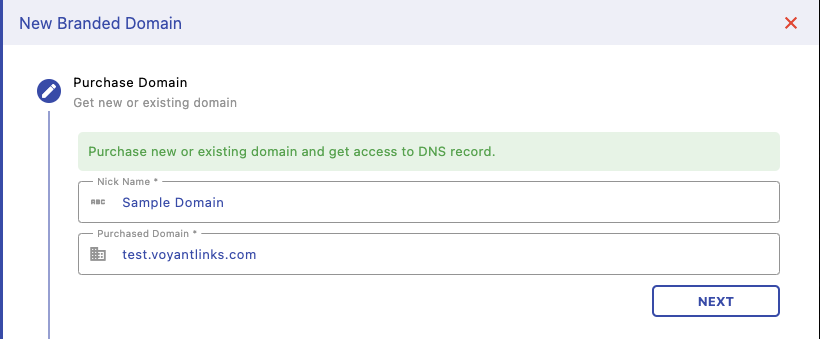
Enter your domain and give it a nickname for easy identification. You can use a new or existing domain. Once added, you’ll be guided to configure DNS records.
Add CNAME Record
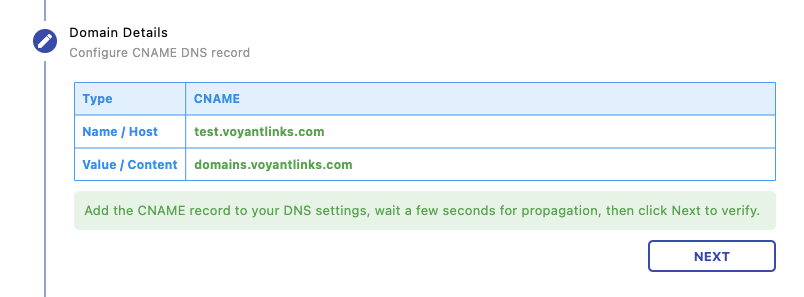
Go to your domain provider’s DNS settings and add the CNAME record shown. This connects your domain with Voyant’s infrastructure so links can be resolved correctly.
Verify Domain (TXT Record)
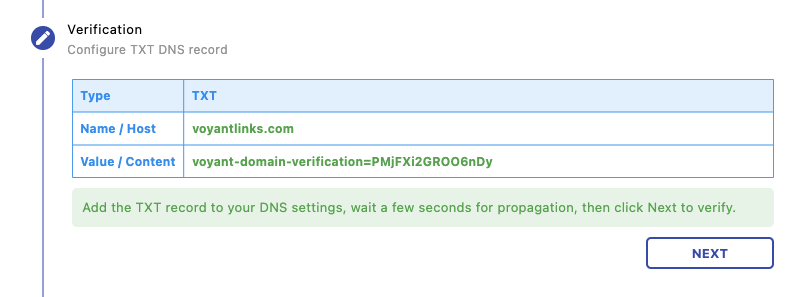
Add the TXT record to verify ownership of your domain. This step ensures only authorized users can use the domain for link generation.
Verification & Usage
After adding DNS records, wait a few seconds to minutes for propagation. Once verified, your domain will be ready to use in business links and campaigns.
Next Steps
Use your domain across links and campaigns: